

Soft Gate
Orange: Warning, but allows entry.
The system uses a specific lifecycle for alerts (e.g., Late Arrival, Missing Equipment). Understanding these statuses is key for efficient management.
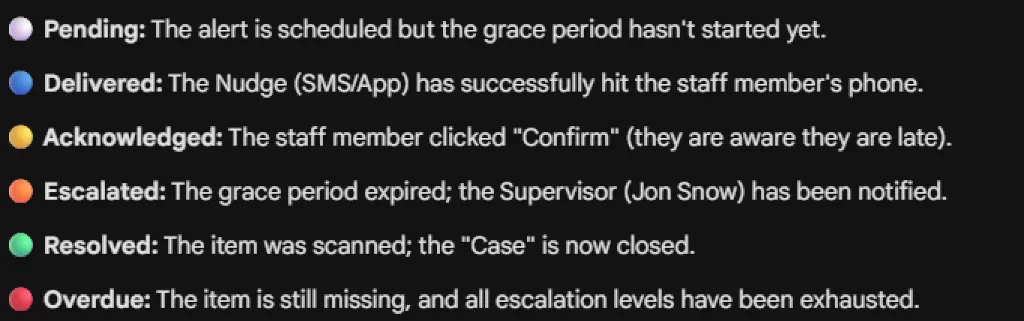
| Status | Colour | Description |
|---|---|---|
| Pending | ⚪ White | The alert is scheduled but the grace period hasn’t started yet. |
| Delivered | 🔵 Blue | The Nudge (SMS/App notification) has successfully hit the staff member’s phone. |
| Acknowledged | 🟡 Yellow | The staff member clicked “Confirm” to acknowledge the alert (e.g., they know they are late). |
| Escalated | 🟠 Orange | The grace period expired without resolution; the Supervisor has been notified. |
| Resolved | 🟢 Green | The issue is fixed (e.g., item scanned, worker arrived); the “Case” is now closed. |
| Overdue | 🔴 Red | The item is still missing or issue unresolved, and all escalation levels have been exhausted. |
Visual reference for the various status badges used throughout the system.
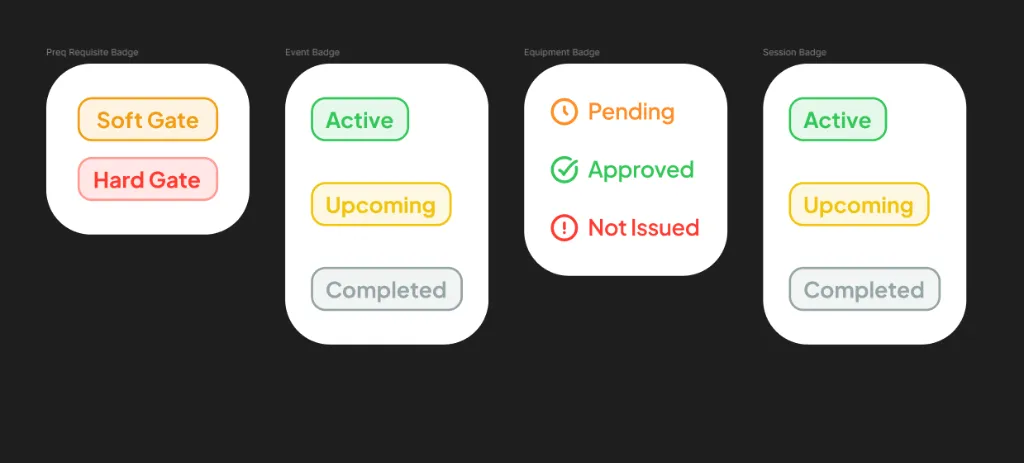
Soft Gate
Orange: Warning, but allows entry.
Hard Gate
Red: Blocks entry until resolved.
Active
Green: Event is currently running.
Upcoming
Yellow: Event is scheduled for the future.
Completed
Grey: Event has finished.
Pending
Orange: Equipment request made, not yet processed.
Approved
Green: Equipment issued/approved.
Not Issued
Red: Equipment request denied or not given.
Active
Green: Session is currently running.
Upcoming
Yellow: Session is scheduled.
Completed
Grey: Session finished.