

AXLR8 Data Sync
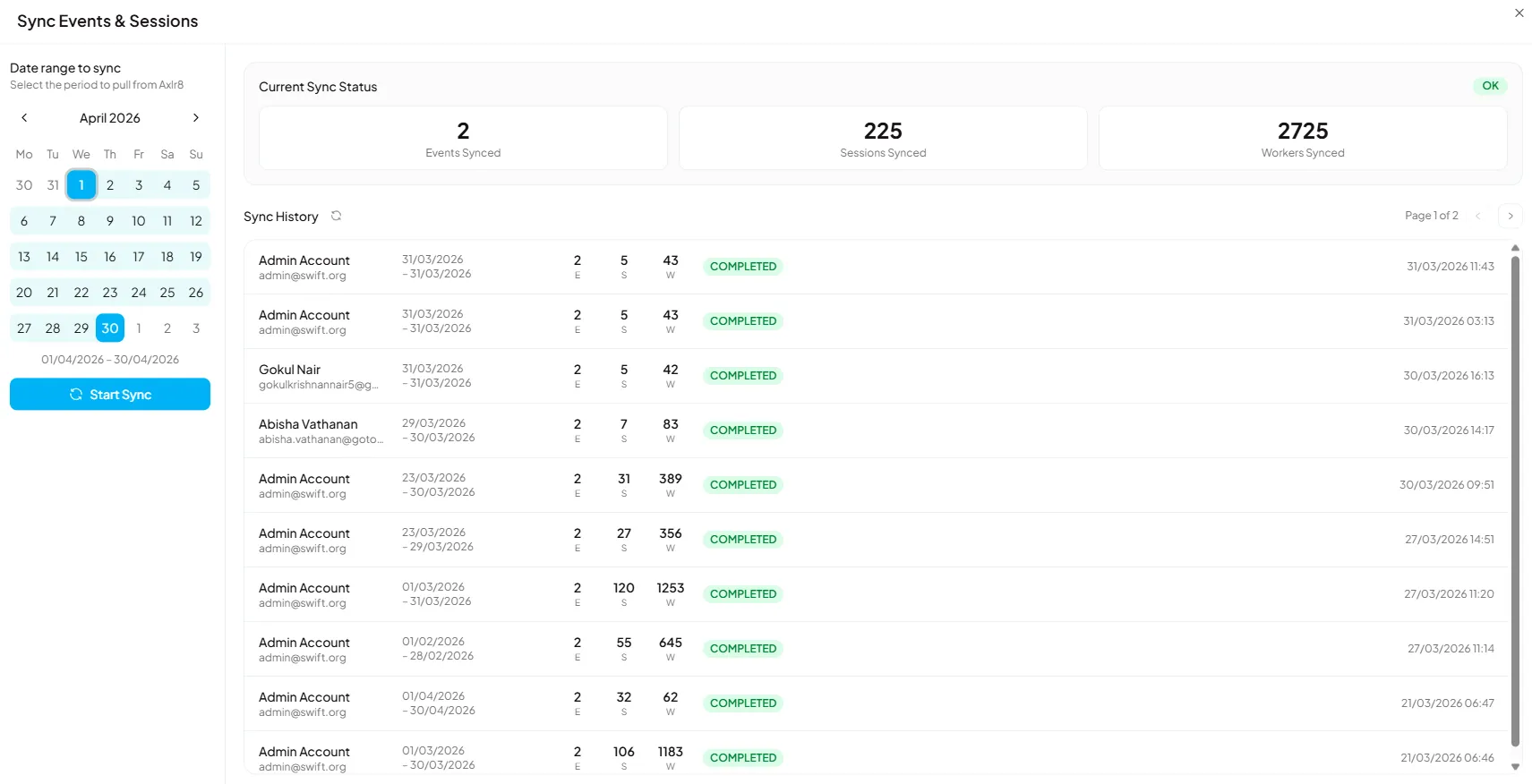
Managers and admins can sync booking data from AXLR8 by selecting a custom date range directly from the dashboard. Managers can sync their own respective events, while admins can sync across all events.
How It Works
Section titled “How It Works”- The sync updates worker assignments and booking end times within the selected date range.
- The sync is mapped per month - selecting a date range within the current month is recommended for accurate results.
- Syncing beyond a single month is possible but may result in data conflicts.
Current Sync Status
Section titled “Current Sync Status”The Current Sync Status panel shows the totals from the most recent sync:
- Events Synced - Number of events pulled from AXLR8
- Sessions Synced - Number of sessions updated
- Workers Synced - Number of worker assignments updated
Sync History
Section titled “Sync History”The Sync History table records all previous syncs with the following details:
| Column | Description |
|---|---|
| Account | The user who triggered the sync |
| Date Range | The period that was synced |
| E / S / W | Events, Sessions, and Workers synced |
| Status | Result of the sync (e.g., Completed) |
| Timestamp | Date and time the sync completed |