

Escalation Rules
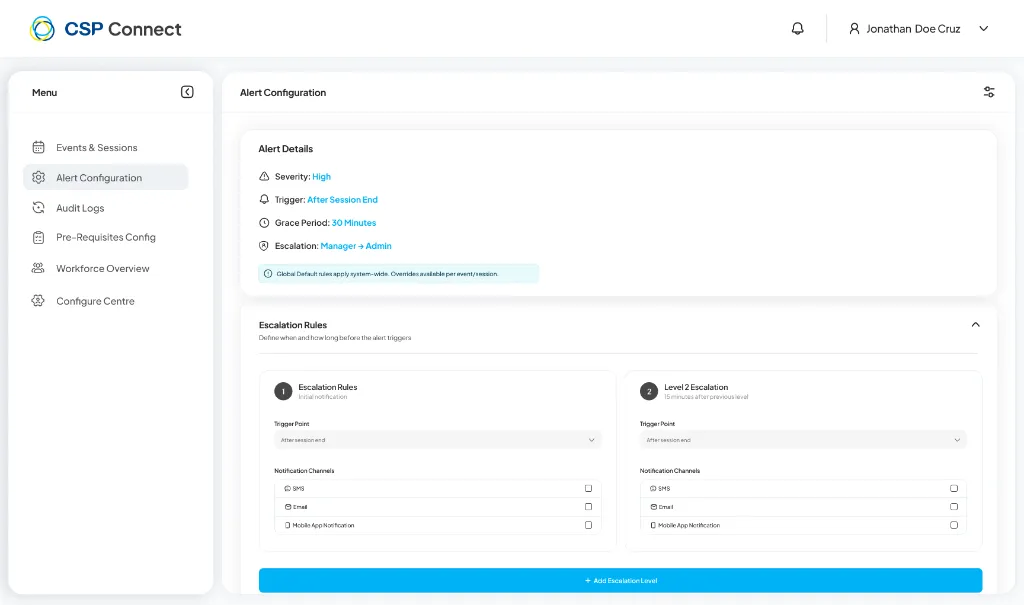
Escalation rules determine who gets notified and how notifications are sent when an alert is triggered.
Escalation Levels
Section titled “Escalation Levels”The system supports multiple escalation levels. Configure each level to determine when and how notifications are sent:
-
Level 1 Escalation (Initial Notification)
Section titled “Level 1 Escalation (Initial Notification)”First notification level when the alert triggers.
- Trigger Point: Select when this escalation activates (e.g., After session end)
- Notification Channels:
- SMS – Send text message alerts
- Email – Send email notifications
- Mobile App Notification – Push notifications to the mobile app
-
Level 2 Escalation
Section titled “Level 2 Escalation”Escalates after the previous level if the alert remains unresolved.
- Trigger Point: Select when this escalation activates (e.g., After session end)
- Notification Channels:
- SMS
- Mobile App Notification
-
Additional Levels (Optional)
Section titled “Additional Levels (Optional)”Click + Add Escalation Level to create additional escalation tiers beyond Level 2.